ICU, MessageFormat and CLDR
 It’s interesting that when I ask AI about ICU MessageFormat it starts off by telling me to open a resource file from almost any modern application and sooner or later you will find a string like this:
{count, plural, one {# unread message} other {# unread messages}}
Well, I’m not completely new to this industry but I appear to have been sheltered over the last 20-years (yes, in a months time it will have been that long) and whilst I may have come across strings like this before, the bit that apparently went past me in my ignorance was exactly what this is used for and how they really need to be translated. There is no doubt in my mind that had I seen such a string I would have treated it as a placeholder not to be translated!! I would have been 100% incorrect. Interestingly this sort of notation is apparently around 30-years old but in my defence probably only really became common in translation packages in the mid 2010s… ish when JavaScript and mobile frameworks adopted it and were supported mainly by developer-facing platforms rather than CAT tools to deal with plurals. I imagine regular Passolo users see these a bit more, and the RWS docs address plurals under a section on Android String Resources, calling them “Quantity Strings (Plurals)”. You need the “Add-in Android Resource File Parser” in Passolo for these files. Passolo makes things a bit easier here, because its Android parser knows which forms each target language needs and offers them for translation. JSON and Properties files are not so simple. They have no plural structure of their own, so the ICU string sits inside a single value and a tool has to parse the braces before it can tell there are forms in there at all.
If you haven’t come across these formats before you are probably still wondering what I’m talking about, so to help let’s take the example ICU MessageFormat I gave at the start:
{count, plural, one {# unread message} other {# unread messages}}
and look at this as an Android file, which for English would be this:
<plurals name="unread_count">
<item quantity="one">%d unread message</item>
<item quantity="other">%d unread messages</item>
</plurals>
For Arabic this:
<plurals name="unread_count">
<item quantity="zero">لا توجد رسائل غير مقروءة</item>
<item quantity="one">رسالة واحدة غير مقروءة</item>
<item quantity="two">رسالتان غير مقروءتان</item>
<item quantity="few">%d رسائل غير مقروءة</item>
<item quantity="many">%d رسالة غير مقروءة</item>
<item quantity="other">%d رسالة غير مقروءة</item>
</plurals>
It looks a little more obvious what the problem is for a tool like Trados Studio when you read it this way. If you create a project in Trados Studio based on the English Android source file, you’ll get an SDLXLIFF with two segments for translation. One for the singular “unread message” and one for the plural “unread messages”. Every target language in your Trados Studio project will also have these two strings; but as we see from the Arabic we actually need six! For Android files this is where Passolo’s parser earns its keep, because it knows the forms each language needs and offers them. For the JSON and Properties files that this post is about, nothing does.
So if you are a developer, that short MessageFormat string is a small relief as they don’t need to create files that contain all of these forms for translation, they just create one short one. If you are a translator however, it may be a small headache, and in some languages a large one. You could of course take the single string, open it in Trados Studio as one translatable segment:
{count, plural, one {# unread message} other {# unread messages}}
But you’d need to return the translated files like this:
Arabic:
{count, plural, zero {لا توجد رسائل غير مقروءة} one {رسالة واحدة غير مقروءة} two {رسالتان غير مقروءتان} few {# رسائل غير مقروءة} many {# رسالة غير مقروءة} other {# رسالة غير مقروءة}}
Romanian:
{count, plural, one {# mesaj necitit} few {# mesaje necitite} other {# de mesaje necitite}}
In a file with hundreds of strings that’s a lot of room for error!
Anatomy of the ICU MessageFormat
To understand this better let’s write the single line in this way:
{count, plural,
one {# unread message}
other {# unread messages}
}
count is the name of the value. It’s also just a name that the developer chooses… it could have been simply n. If you translate this name, you break the code;
plural tells the application that the text it shows depends on that number. There are two pieces of text to choose from, and each has a label saying when to use it. one means “use this when there is one”. other means “use this the rest of the time”;
# inside the text is where the number itself is written.
So with 5 unread messages, the application sees that 5 is not one, picks the other text, and writes 5 in place of #: “5 unread messages”. With 1 unread message it picks the one text: “1 unread message”.
If we put this concept into a more realistic scenario you are probably familiar such as a messaging app, we may get a file like this:
{
"app.name": "Inbox",
"nav.inbox": "Inbox",
"nav.sent": "Sent",
"nav.drafts": "Drafts",
"nav.archive": "Archive",
"nav.settings": "Settings",

"inbox.greeting": "Hello {name}, welcome back!",
"inbox.unreadCount": "Hello {name}, you have {count, plural, one {# unread message} other {# unread messages}}!",
"inbox.empty": "Your inbox is empty.",
"inbox.selected": "{count, plural, =0 {No messages selected} one {# message selected} other {# messages selected}}",
"inbox.lastChecked": "Last checked {when, time, short}",

"message.from": "From {sender}",
"message.received": "Received {when, date, long}",
"message.attachments": "{count, plural, =0 {No attachments} one {# attachment} other {# attachments}}",
"message.recipients": "Sent to {count, plural, one {# recipient} other {# recipients}}",

"drafts.unsaved": "You have {count, plural, one {an unsaved draft} other {# unsaved drafts}}. Save before leaving?",

"archive.moved": "{count, plural, one {# message was} other {# messages were}} moved to the archive.",
"archive.deleted": "{count, plural, one {# message was} other {# messages were}} deleted. Undo?",

"storage.used": "You are using {used, number, ::percent} of your storage.",
"storage.full": "Your storage is full. Delete some messages or upgrade your plan.",

"notify.sent": "{sender} sent you a message.",
"notify.reply": "{sender} replied to {gender, select, female {her} male {his} other {their}} message.",
"notify.mentions": "{sender} mentioned you in {count, plural, one {# message} other {# messages}}.",
"notify.queue": "You are {position, selectordinal, one {#st} two {#nd} few {#rd} other {#th}} in the support queue.",
"notify.digest": "{count, plural, one {# new message} other {# new messages}} from {senders, plural, one {# sender} other {# senders}} since you last checked.",

"button.send": "Send",
"button.reply": "Reply",
"button.replyAll": "Reply all",
"button.forward": "Forward",
"button.delete": "Delete",
"button.cancel": "Cancel",

"error.noConnection": "Couldn't connect. Check your network and try again.",
"error.sendFailed": "Your message wasn't sent. It's saved in Drafts."
}
In Trados Studio we’ll create a multilingual project going from English to Arabic, German, Japanese and Russian. Every language will be presented like this:
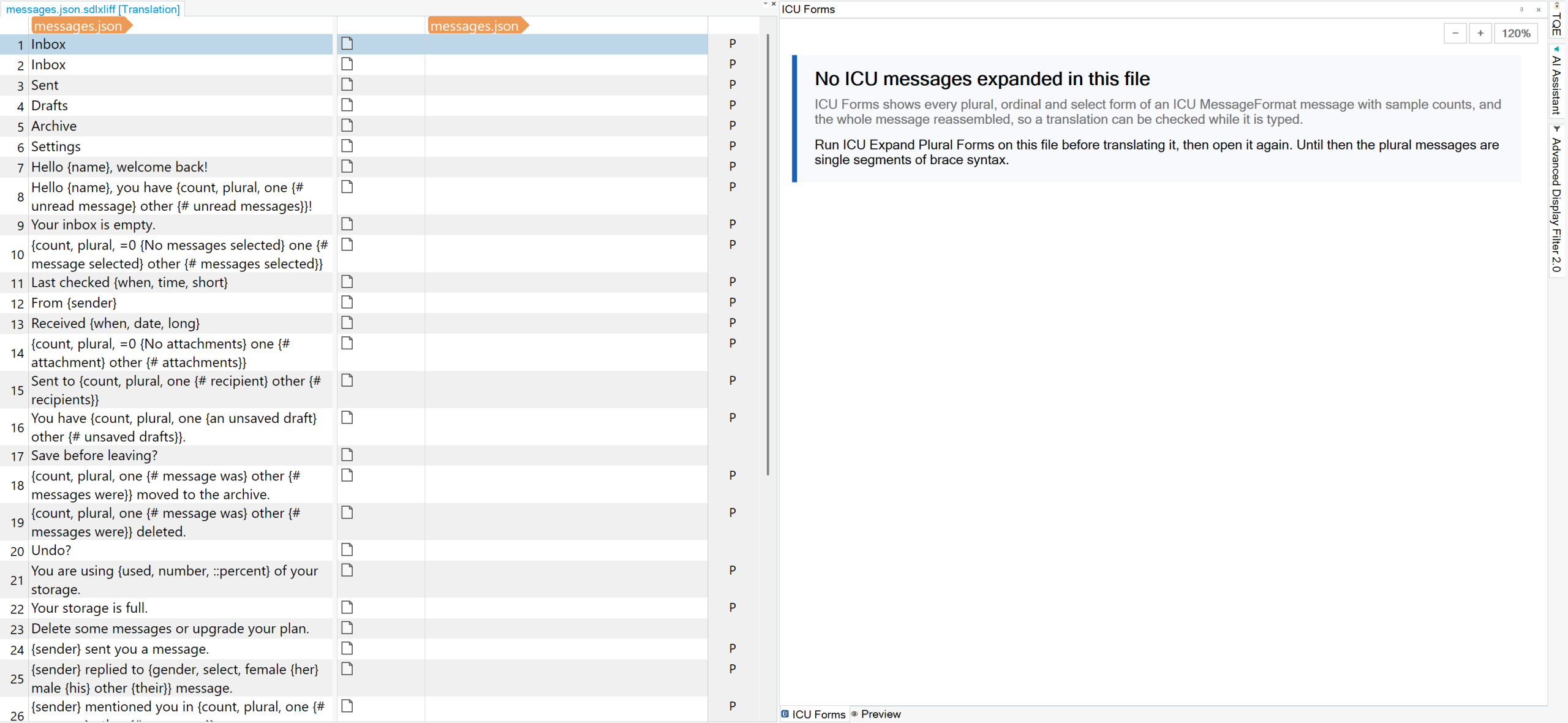
The ICU Forms preview on the right is part of the multifariousICU Support for Trados Studio plugin. Here it’s explaining that we have not expanded the messages so the translator would have to do this themselves making sure that the braces and syntax for each segment are correctly written… a very difficult task as we will see shortly.
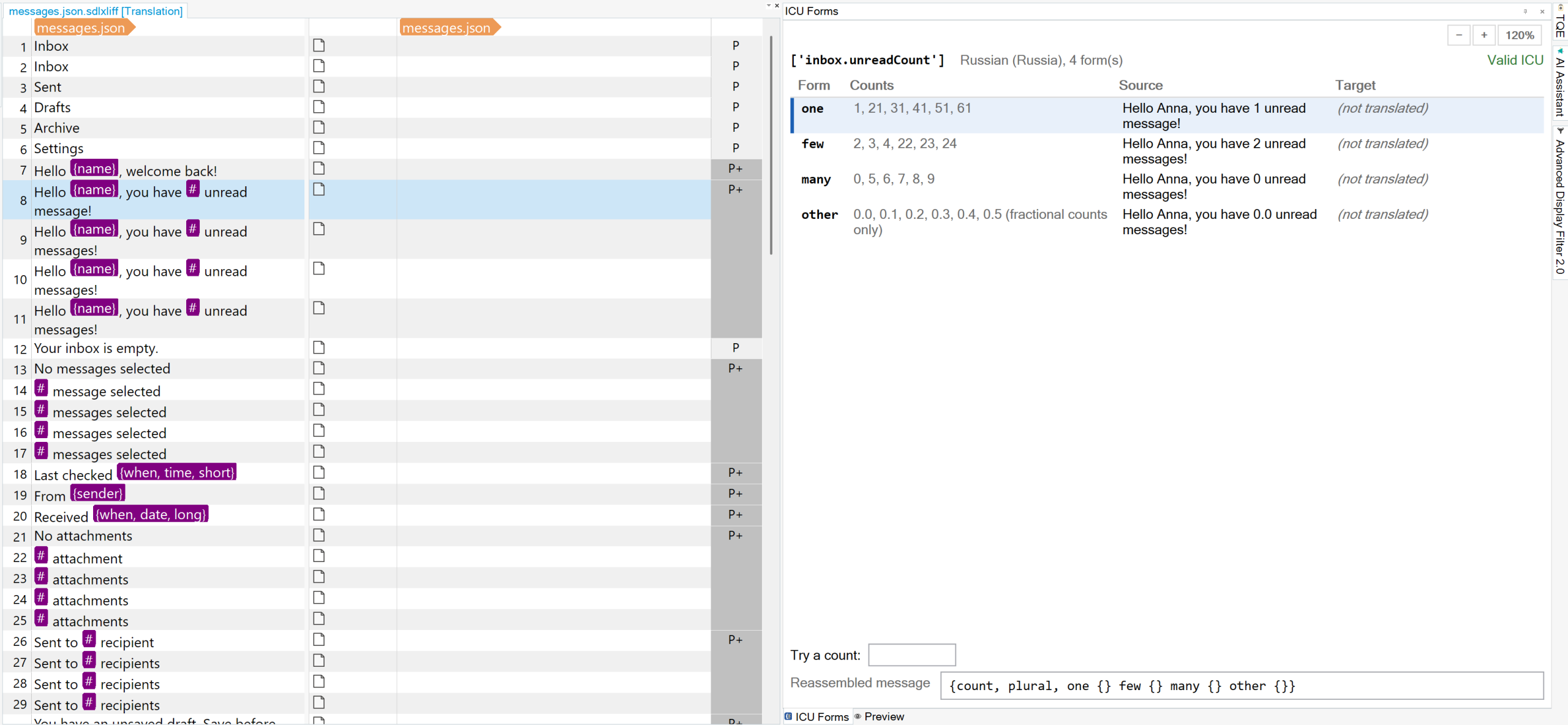
I’m not going to explain how the plugin works in detail… for that it’s better if you visit the product page – multifarious.filkin.com/product/icu-support – where you should find what you need to test this yourself. But I will run the expansion batch task just to show you the difference – look at segment #8. In the screenshot above it’s only one segment, but when expanded for Russian it now becomes four to allow the translator to properly manage the translations and not have to attempt to translate a single string into four, risking corruption of the code. Also note that in this screenshot the non-translatable elements are also correctly tagged by the plugin so there is no need for the translator to prepare the filetype with parser rules:
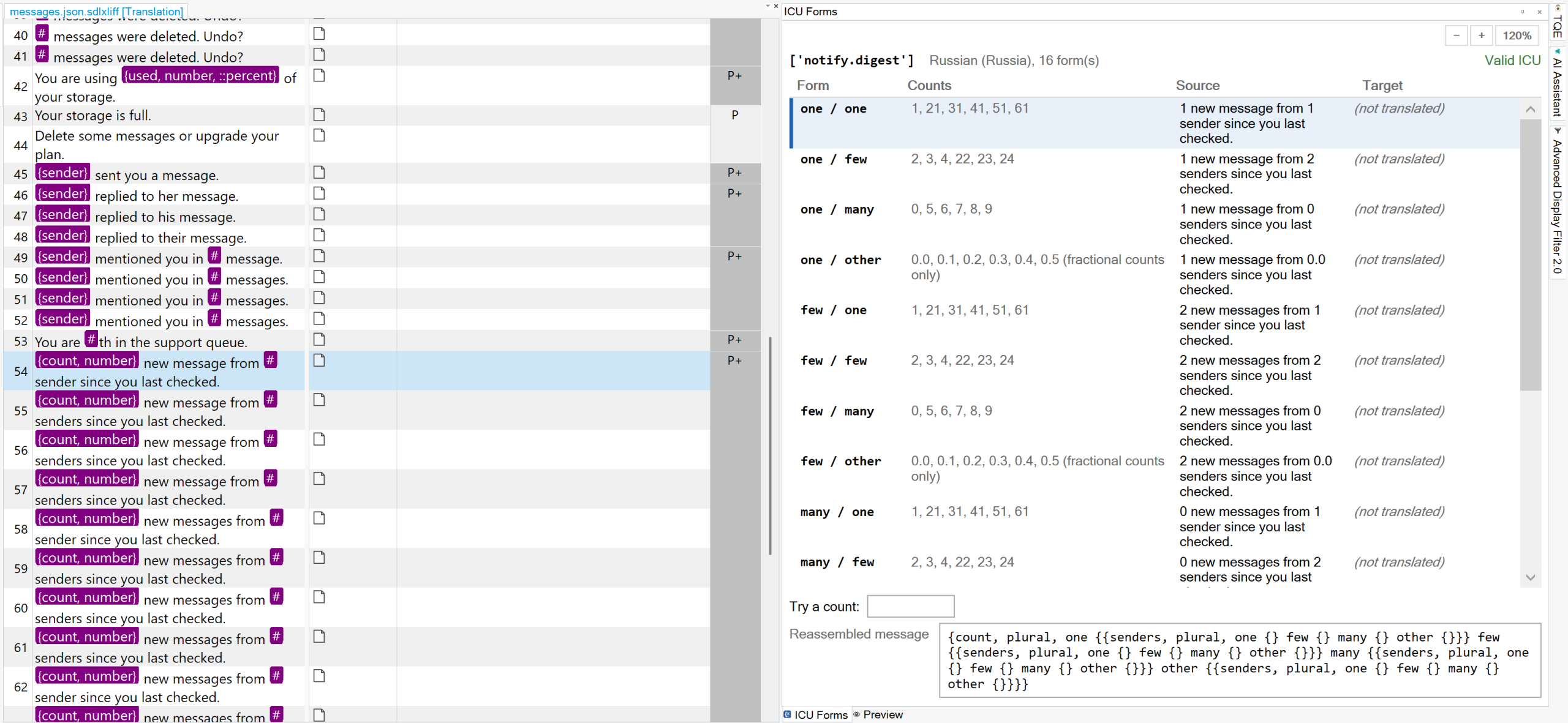
Now, there may be technical translators out there who might be thinking it’s easy enough to manage this without a plugin, so I threw a nice variant containing two independent plurals into the mix… segment #28, below the visible part of the first screenshot, before expanding the segments. That single segment becomes sixteen for Russian:
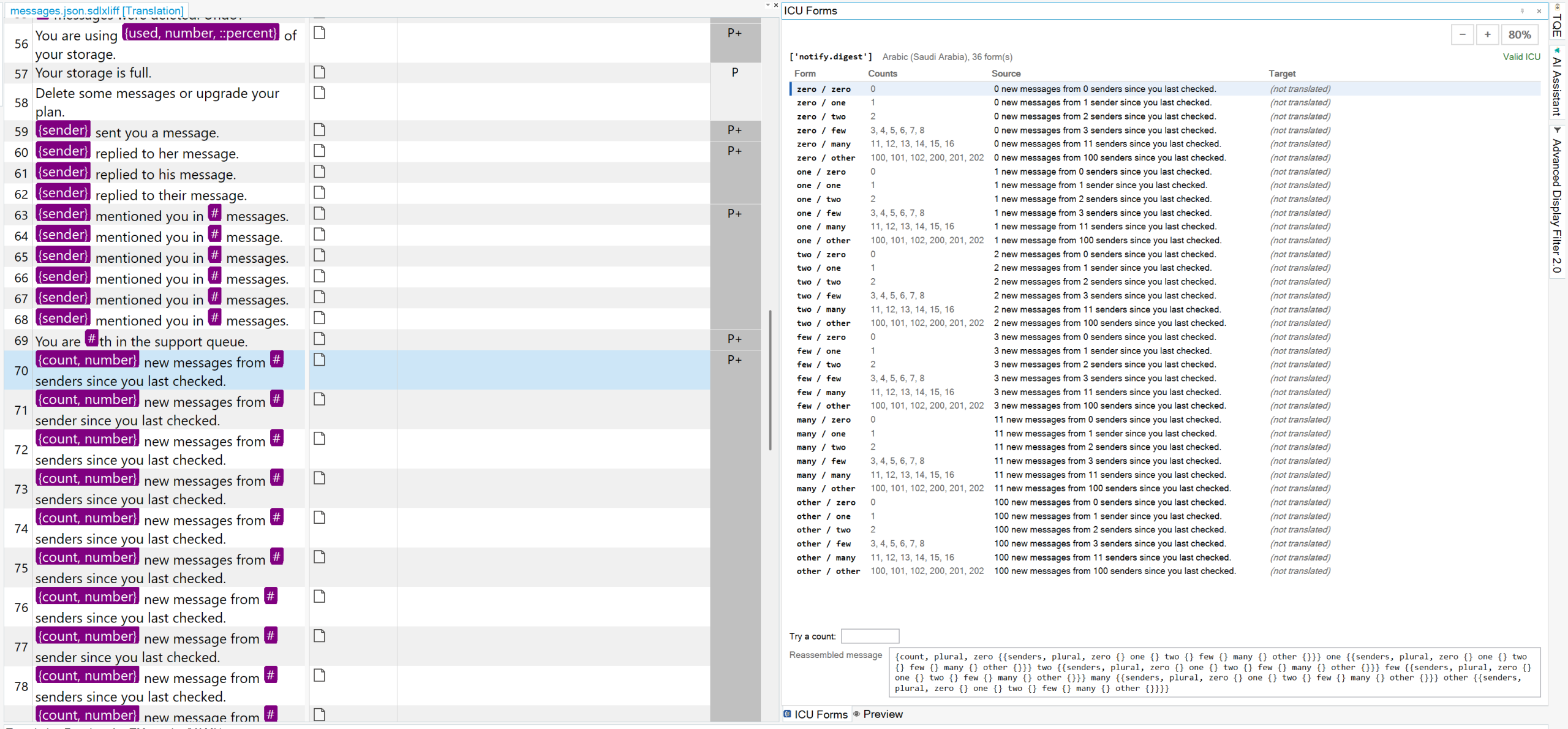
In Arabic it’s even more complex with 36 forms. I had to change the default plugin setting of a maximum of 24 forms to allow Studio to create this, but you can see how complicated and time consuming it could become. The structure of the sentences and number of plurals in a single sentence could grow the initial estimate of work considerably, not only from the source wordcount, but also in terms of how long it could take to manually reassemble the ICU MessageFormat:
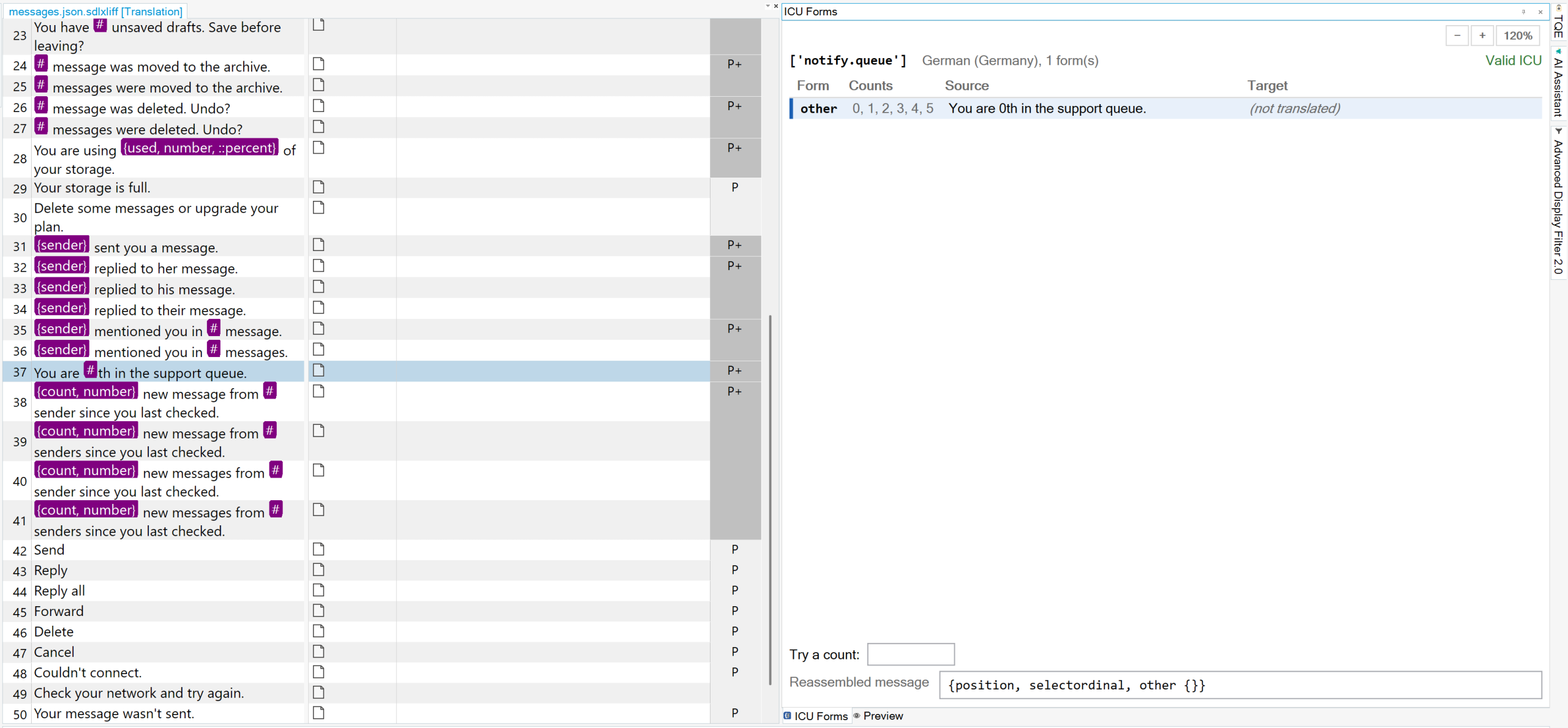
One last example, because expansion doesn’t always mean more. The message “You are {position, selectordinal, one {#st} two {#nd} few {#rd} other {#th}} in the support queue.” has four forms in English, one each for 1st, 2nd, 3rd and 4th. German has no such distinction: it writes every ordinal the same way, so CLDR gives it a single ordinal category. The plugin collapses the four English forms into one German segment, “You are #th in the support queue”, and the ICU Forms window shows one row, other, selected by every number, with the reassembled message {position, selectordinal, other {}}. The German translator writes one sentence, and the generated file carries one branch. Had the file been Welsh, the same message would have become six!
I haven’t covered actually translating these files, or Finalising the target file with the “ICU Finalise Messages” batch task. But this batch task would be run at the end of the project where it reassembles the translated expanded segments back into the ICU MessageFormat expected by the receiving application. Full details are in the product help.
Where to find it
The plugin is on the RWS AppStore and in the integrated AppStore inside Trados Studio 2026. The user guide, with screenshots of each step, is on the product page at multifarious.filkin.com/product/icu-support.
If you translate ICU messages and something doesn’t look right, a grammar hint for your language is wrong or missing, or you need a file type that should support this format that is not there yet, I would like to hear about it and can hopefully improve the app to make it more useful for everyone.
