
 As I’m writing this I can hear the cry of “Use a CAT tool for translating literature, or prose… no way!” This is a discussion I see from time to time and there are some pretty strong feelings on this subject for a number of reasons. One of the reasons given is that you cannot take this type of material sentence by sentence and just do a literal translation. Other reasons may be more detail around this same point, and also touch on the need for a creative flow because this type of translation requires a very creative writing style rather than literally translating the words.
However, I thought I’d use this subject as a good reason to share a little used feature of Studio called “Paragraph” segmentation which does lend itself to allowing more of a creative style of translation than the segment based translation you see by default.
By way of example I read an interesting dissertation from the University of Surrey on the translation of children’s literature by Gabriele Thomson-Wohlgemuth. She explains with lots of good examples how the translator will change the material being translated by adding or omitting words and sentences to suit the perceived cultural and moral values of the target audience. Whilst I’m not qualified to critique the paper, I can of course relate to many of the findings and in particular this example of where there is apparently a trend in Germany to educate children to be aware of their rebellious nature against their parents… no further comment on that!
The source text of this particular example comprises of just two sentences from a children’s book called “Peace at Last” by Jill Murphy.
“Never mind,” said Mrs Bear. “I’ll bring you a nice cup of tea.”
In Studio this would normally create a bilingual document with two segments like this:

This would not be a problem had the German translation been two sentences as well. But it is actually five sentences, like this:
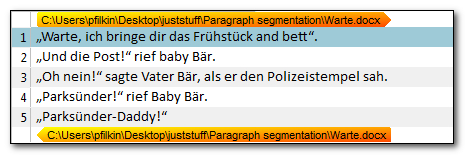
It would be pretty difficult to handle this translation using the default sentence based segmentation because the translator apparently felt the need to add information to portray the child as being “full of malicious joy towards his father”.
So, to avoid this difficulty in being able to be more free with the contents of a paragraph you can use what’s called “Paragraph Segmentation”. To set this up you open the Translation Memory settings and edit the Language Resources here:
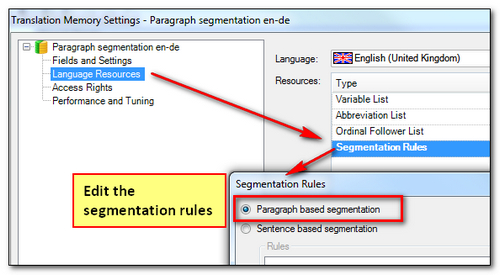
This will of course reset any customisation you might have had for an existing Translation Memory so be careful trying this with your production Translation Memory… probably better to create a new one to test it if you’re interested.
Now when I open the file I see this, and I can do whatever I like in the target segment:

At this point you may be asking why this is different to simply merging the segments in a sentence based segmentation? The answer of course is because if this is a large piece of work you would have to merge segments all the time, which is pretty disruptive to your creative flow. Using paragraph based segmentation in the first place allows you to address the document with all the paragraphs treated in this way so you can add or omit sentences without having to merge or split at all and you have the entire paragraph presented in a way that makes the context easier to translate for some source material. For example:
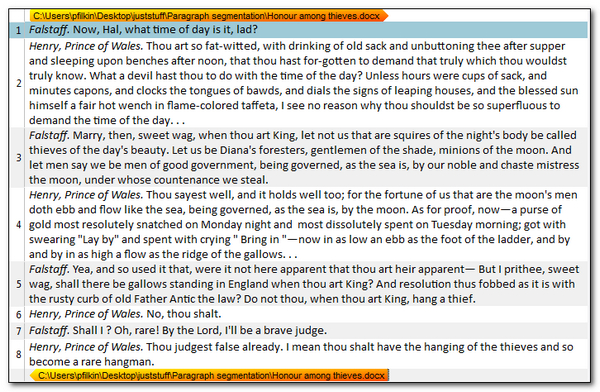
I wouldn’t dare risk a translation of this myself… but I think it would be easier, nay possible, with segmentation like this.

I was at the very entertaining presentation by the well-known Italian author Beppe Severgnini and his British translator Giles Watson at the ATA Conference in San Diego last year. To my surprise Giles mentioned that he uses a CAT tool when translating Beppe’s books. Of course, I had to ask which tool… and he’s using Trados Studio! Unfortunately, I didn’t think to ask about his segmentation rules…
Hi Paul and Tuomas,
First off, I don’t consider myself a literary translator – I haven’t done any fiction although I’m always willing to listen to offers 😉 – but I do do a lot of publishing work, for which I invariably use Trados before going over to Word and PerfectIt for revision (yes, I keep the TMs up to date). In other words Trados is part, but not the whole, of a text management routine.
Segmentation is a genuine limitation, if generally not a huge one for Italian to English. Most of the time, you can join or split segments as you go along but sometimes – not very often, in my case – this has to be a separate, pre-translation stage (and thanks for reminding me about paragraph segmentation).
There was no particular time pressure for Beppe’s books but the other big advantage of Trados is that it lets you work directly on DTP files such as InDesign, which can shorten lead times significantly.
Greetings from cold, damp northern Italy (ah, that San Diego sunshine!),
I wrote an article in Polish about using CAT tools (Studio in particular) in translating literature. Hopefully someone finds it useful as a follow up to your post.
https://www.localize.pl/Narzedzia-CAT-w-tlumaczeniach-literackich-blog-pol-1564083201.html