
 “More power to the elbow”… this is all about getting more from the resources you have already got, and in this case I’m talking about your Translation Memories. In particular I’m talking about enabling them for upLIFT. upLIFT, in case you have not heard about this yet despite all the marketing activity and forum discussions since August this year, is a technology that is being used in SDL Trados Studio 2017 to enable some pretty neat things. I’m not going to devote this article to what upLIFT is all about as Emma Goldsmith has written a really useful article today that does a far better job than I could have done. You can find Emma’s article here, called “SDL Trados studio 2017 : fragment recall and repair“. But a quick summary to get us started is that upLIFT enables things like this:
- fragment matching
- whole Translation Units
- partial Translation Units
- fuzzy match repair
- from fragment matching
- from your termbase
- from Machine Translation
So it’s really a pretty cool thing that is also another AutoSuggest Provider, so you can enter the fragments as you work just by typing what you see. Now, this leads me into what I’d like to talk about first, before I get to preparing your Translation Memories, and that’s how to make the most of what’s become a very busy interface with information potentially coming from all over the place. It’s not immediately obvious how useful the Fragment Matching can be as the windows are quite small on a single screen but with a little elbow grease before you start you can find the best solution for you. To demonstrate this I have prepared a quick video showing how to move the windows around to get what you want.
Arranging your View Parts
Video: Approx. 4 minutes running time
Now that we have the interface as we like it let’s come back to the knub of this article. Preparing your TMs for upLIFT. Out of the box, as Emma explained, you have to go through a three step process:
- Turn on the Fragment Alignment Status

- Build the Translation Model
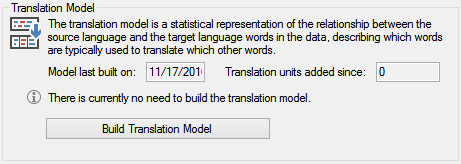
- Align the translation units
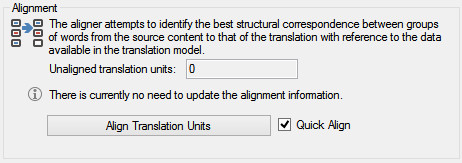
You have to do this to enable fragment matching. If you want to know more about why then I highly recommend you take a look, or join the discussion, in this thread in the SDL Community. The principal developer of upLIFT in Studio is discussing how it works and answering some interesting questions from Studio 2017 users.
If you never import a TM into your TM, or merge TMs then you probably won’t need to do this preparation exercise again as the TM is updated automatically in realtime after this. But if you do any merging or importing then you will have to repeat the process to prepare the additional TUs that have not been added while working with Studio 2017.
Now, that in itself is not too bad… but what if you have twenty, or a hundred Translation Memories? Then it becomes quite a process as you can only do one at a time, and as you do this you can’t use Studio for anything else. So set aside an evening, or a weekend, when you are not doing anything else to tackle the Translation Memory preparation tasks! And before you start go and download ReindexTMs from the SDL AppStore. This app was first introduced when we released Studio 2014 SP2 and introduced the concept of Alphanumeric placeables. It allowed you to reindex multiple Translation Memories to support this enhancement in one sitting by automatically carrying out the process that you would otherwise have to complete, one Translation Memory at a time, in Studio. For Studio 2017 the AppStore team have enhanced this little app and converted it to an sdlplugin and added the capability to run the upLIFT process for multiple Translation Memories in one go.
I thought the best way to show you how to do this was with a demonstration, so I took six Translation Memories, created courtesy of the DGT, and prepared them for upLIFT in one go. The process is in the video below… I hope it’s helpful.
The Process
Video: Approx. 10 minute running time

Thanks for the article. When I upgrade a TM, will it be backward compatible with Studio 2015?
Yes it will. But if you use this TM in 2015 then you will find it falls behind wrt fragment updates and you will have to keep running the upLIFT process to keep it in synch. 2017 updates itself automatically, but 2015 hasn’t got a clue about Fragment Matching so doesn’t!
Hi Paul, and thanks for the overview. I agree that upLIFT and adaptiveMT are breakthroughs in translator productivity and I’m also looking forward to hearing what translators think about the technology once it is more established.
Do you know if the GroupShare API will be extended to do the three steps to prepare a server TM for fragment analysis? As you may well understand, “setting aside a late night or weekend” just won’t do the trick when you literally have got several thousands of TMs. This needs to be done programatically of course.
/Andreas
Hi Andreas, I’d recommend you take a look at this thread and ask your questions in there… as I mentioned in the article 🙂 I reckon the answer is yes… but ask in the community to make sure and then you can also have your say with the people who matter!
Hi Paul, Thank you for you valuable insights. I think I’m having troubles with fragment matches. Would you be so kind and take a look at the screenshot from the link below? The fragment matches windows remains empty while there are some conconrdance results. Shouldn’t it contain some fragment matches?
Link: http://prnt.sc/d96lqu
Hi Marcin, better to post your questions into the SDL Community. But in the meantime make sure you have activated the fragment matching in your search options as shown in Emma’s article.
Thanks Paul! This is very informative, and I think I’m liking your window layout. I noticed in your video that your Finnish TM only about doubled in size but all the other updated TMs are about 5 times bigger than the original ones. That’s also true with my own Finnish TMs; they are all only about twice the size of the original. Could this be because the numerous endings in Finnish make it more difficult to find these aligned fragments and because of that there are fewer of them and the TM size is smaller?
Hi Tuomas, many apologies for the very late response. I discussed this with the developer and he thinks your explanation is quite likely.
Hi Paul,
Is there a particular reason you chose Sketch Engine as one of the examples to illustrate the rearrangement of the panes? Have you tried it, and if so, do you find it useful?
Mats
Hi Mats… nope. I just happened to have been testing it when I created this post. I think it is quite useful… although would be much better if it was integrated as a terminology provider as opposed to as a weblookup which is essentially what this is, only within a view part in Studio. Still really useful though for those who use this resource via the web… nice to have it integrated like this even if you don’t get the automatic recognition aspects.
I see that Reindex TMs now has been renamed TM Lifting (but the URL is the same).